

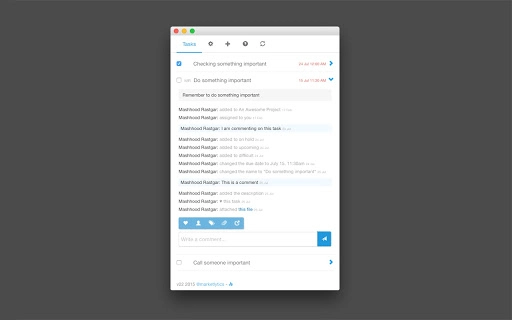
Description
Offline Asana Task Viewer with Fast Access
Overview
The Asana desktop application offers a streamlined, offline-capable task viewing experience for users of the Asana project management platform. Designed for professionals who rely heavily on Asana for workflow coordination, the software enables quick access to tasks, project details, and team updates without requiring a browser tab to remain open. By caching data locally, it supports uninterrupted productivity even when internet connectivity is unstable or unavailable.
Target users include Asana power users, remote teams, and individuals managing multiple projects across different workspaces. The application enhances workflow efficiency by allowing users to mark tasks as complete, comment, upload files, and apply filters directly from the desktop interface. Its ability to notify users of task changes via Chrome notifications ensures real-time awareness of project developments.
Developed by Marketlytics, the tool has evolved from a simple viewer to a feature-rich desktop companion with support for personal access tokens, task creation, and advanced filtering. The software’s open-source nature, available on GitHub, promotes transparency and community contributions. It is particularly beneficial for users seeking a faster, more responsive alternative to browser-based Asana navigation.
Key Features & Capabilities
- Offline Task Access – Caches Asana tasks locally, enabling full functionality without an active internet connection.
- Personal Access Token Support – Uses secure personal access tokens instead of legacy API keys for authentication.
- Task Management – Allows users to mark tasks as complete, add comments, and upload files directly from the desktop interface.
- Project & Workspace Configuration – Users can select and switch between workspaces and projects with ease.
- Advanced Filtering & Sorting – Supports basic filters and sorting options to organize tasks by priority, due date, or team.
- Global Keyboard Shortcut – Enables instant visibility of the app with a single key combination, ideal for quick task checks.
- Real-Time Notifications – Delivers Chrome-based alerts when tasks are updated, ensuring users stay informed.
- Task Creation – Basic functionality to add new tasks to existing projects.
- Flexible UI Settings – Includes options for window resizing, stay-on-top mode, and disabling auto-updates.
These features are especially useful for users managing high-volume workflows, such as marketing teams, software developers, and project managers. The ability to comment with a single press of Enter or view full names in task stories improves collaboration efficiency. The support for due times and task tags further enhances task clarity and organization.
User Interface, Workflow & Performance
The user interface is designed for minimal distraction and maximum efficiency. It presents tasks in a clean, structured layout with clear visual hierarchy, allowing users to scan and interact with project data quickly. Navigation between workspaces and projects is intuitive, supported by a streamlined selection menu.
Workflow efficiency is enhanced through the global keyboard shortcut, which enables instant access to the app at any time, even when working in other applications. The interface supports flexible window resizing, allowing users to adjust the view based on screen size or multitasking needs. The “stay on top” option ensures the app remains visible during focus sessions.
Performance is optimized for speed and responsiveness. The application leverages local caching to reduce load times and minimize dependency on network latency. The developer did not specify resource usage details, but general behavior suggests efficient CPU and RAM usage typical of lightweight desktop utilities. Stability appears strong, with no reported issues in recent versions. The app runs without requiring constant background processes, contributing to a smooth user experience.
Compatibility & System Requirements
The software is compatible with both Windows and Mac operating systems, supporting the latest versions of each platform. It is available as a desktop application with an installation size of 100 MB, making it lightweight and quick to deploy.
Exact system requirements were not listed. The developer did not provide additional system requirements beyond OS compatibility. Performance observations are based on general software behavior patterns. No specific hardware specifications were included, but the application’s size and functionality suggest it runs efficiently on standard modern desktops and laptops.
Pros and Cons
Pros
- Offline access to Asana tasks without browser dependency
- Fast performance with global keyboard shortcut for instant access
- Supports personal access tokens for secure authentication
- Allows task completion, commenting, and file uploads
- Open-source with public GitHub repository for transparency
- Flexible UI with resizable window and stay-on-top mode
- Real-time notifications for task changes via Chrome
- Basic task creation and advanced filtering options
Cons
- No detailed system requirements provided
- Offline functionality may lag behind real-time sync in complex scenarios
- Feature set is limited to core task management; lacks advanced project tools
- Dependent on Chrome for notifications and background services
- Auto-update mode cannot be permanently disabled (only temporarily)
FAQ Section
Is this app compatible with Windows and Mac?
Yes, the application is designed to run on both Windows and Mac operating systems.
Is the software secure to use with my Asana account?
Yes, the app uses personal access tokens for authentication, which are more secure than legacy API keys. It does not store credentials beyond the token used for access.
Can I use this app without an internet connection?
Yes, the app caches tasks locally, allowing full access to stored data offline. However, changes made offline may sync once connectivity is restored.
Does the app require Chrome to run?
While the app is built using Chrome Apps technology, it operates as a standalone desktop application. Chrome is required for background services and notifications, but not for the core interface.
How do I update the app?
The app includes an auto-update feature, which can be disabled temporarily. Updates are delivered through the Chrome Apps platform.
Final Thoughts
For Asana power users seeking a faster, more responsive desktop experience, this offline task viewer delivers significant advantages. Its combination of speed, offline access, and seamless integration with Asana workflows makes it a compelling tool for professionals managing complex projects across multiple teams.
The open-source nature adds credibility and long-term viability, while the support for personal access tokens ensures secure access. Despite minor limitations in feature depth and lack of detailed system specs, the app excels in usability and performance.
Download Asana Task Viewer now
Guides & Tutorials for Asana Task Viewer App for Chrome
How to install Asana Task Viewer App for Chrome
- Click the Preview / Download button above.
- Once redirected, accept the terms and click Install.
- Wait for the Asana Task Viewer App for Chrome download to finish on your device.
How to use Asana Task Viewer App for Chrome
This software is primarily used for its core features described above. Open the app after installation to explore its capabilities.
User Reviews for Asana Task Viewer App for Chrome 0
No reviews found





